Reign Client FiveM

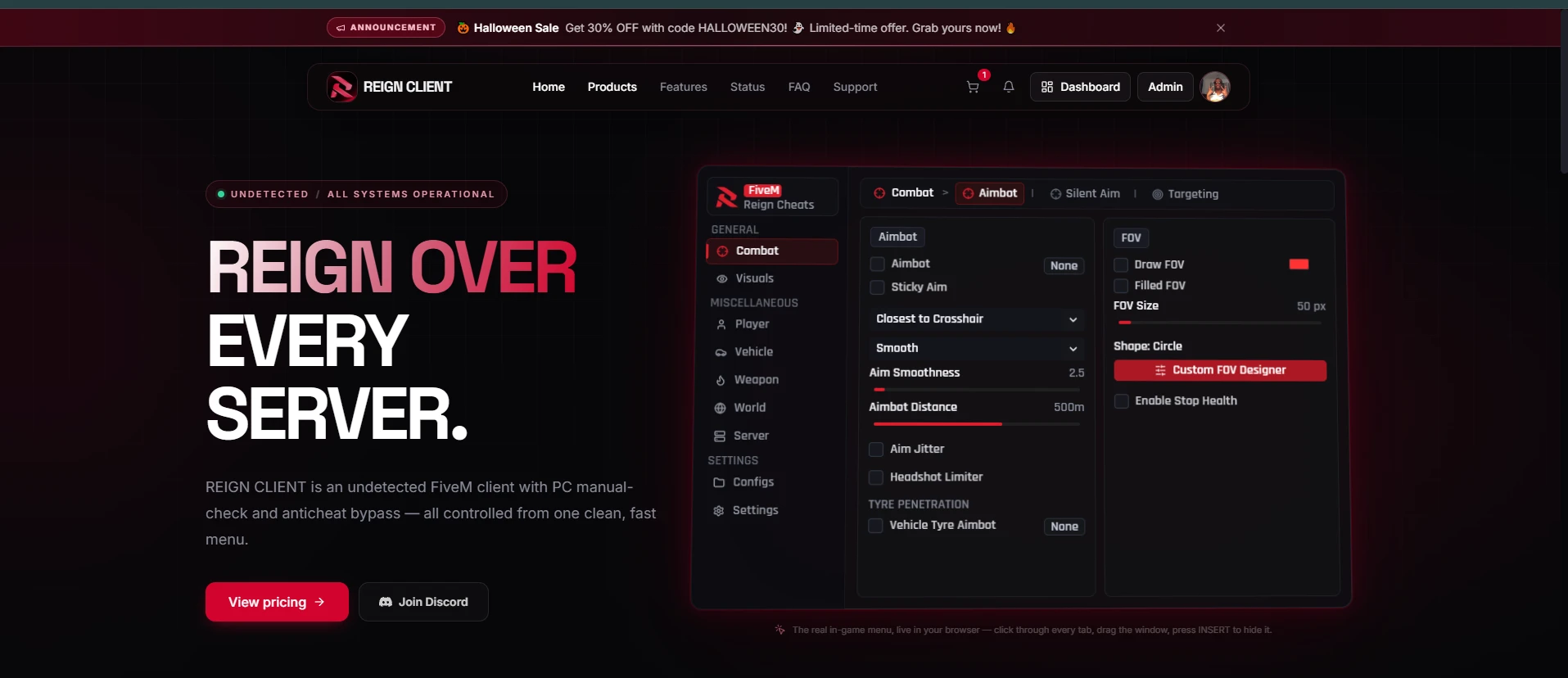
REIGN CLIENT is an undetected FiveM client with PC manual-check and anticheat bypass — all controlled from one clean, fast menu.
Combat
28
Aim assistance from subtle and legit to locked-on, with full control over how targets are picked and hit.
Aimbot
Open in menu
- AimbotKeybind
Pulls your aim onto the selected target bone while the bound key is held. - Sticky Aim
Stays locked on the current target instead of switching to a new one mid-fight. - Target Priority
Pick who gets targeted first: closest to crosshair, lowest health, closest distance or smart threat priority. - Smoothing Curves
Linear, Smooth or Natural easing so aim movement looks human. - Aim Smoothness
From instant snap up to slow, gradual tracking (0–50). - Aimbot Distance
Only engage targets within the set range, up to 800 m. - Aim Jitter
Adds tiny randomised offsets (0.01–0.5°) so tracking never looks robotic. - Headshot Limiter
Caps the share of hits that land on the head to a set percentage. - Vehicle Tyre AimbotKeybind
Aims straight at the tyres of moving vehicles. - FOV Circle
Draw the aimbot FOV on screen, filled or outlined, in any colour and size up to 800 px. - Custom FOV Designer
Customise the FOV shape, thickness, transparency and style. - Stop Health
Won't fire on targets below a chosen health percentage.
Silent Aim
Open in menu
- Silent AimKeybind
Bullets hit the target without your camera moving at all. - Miss Chance
Deliberately misses a set percentage of shots to keep stats believable. - Hit-Zone Randomisation
Spreads impact points slightly across the hit zone (up to 0.15 m). - Silent Distance
Maximum engagement range for silent aim, up to 800 m. - Headshot Limiter
Separate headshot cap for silent aim. - Vehicle Tyre Silent AimKeybind
Silently pops tyres on vehicles in range. - Silent FOV
Its own FOV circle with colour, fill and size, independent of the aimbot FOV.
Targeting
Open in menu
- Dynamic Bone Selection
Automatically picks the best visible bone to aim at. - Bone Markers & Labels
Shows which bone is currently being targeted, with its name. - Movement Prediction
Leads moving targets based on their velocity. - Bullet Drop Compensation
Corrects for gravity on long-range shots. - Aim Deadzone
Ignores micro-adjustments when you are already on target. - Target Stick Time
How long (0–2 s) to hold a target before allowing a switch. - Manual Bone Choice
Lock aim to any of 23 bones, from head and neck down to hands and feet. - Target Filters
Ignore dead entities, include or exclude NPCs. - Visibility Checks
Only target what is actually visible, with optional visible/hidden colours.
Visuals
19
Fully customisable ESP: see every player and NPC with exactly the information and look you want.
ESP
Open in menu
- ESP Master Switch
One toggle to turn every player overlay on or off. - Track NPCs
Extend ESP to non-player characters. - Names, IDs & Distance
Show player names, server IDs and distance above each target. - Weapon ESP
Display what weapon each player is holding, optionally by name. - ESP Distance
Render range from 10 m up to 2 km. - Text Sizes
Independent font sizes for names, distance, IDs and weapons. - Health Bar
Live health and armour bars next to every target. - Skeleton Tracking
Draws the full bone skeleton of each player. - 2D & 3D Boxes
Flat corner boxes or full 3D bounding boxes. - Snaplines
Lines from your screen to every tracked player. - Render Crosshair
Adds a clean crosshair overlay to the screen.
Colors
Open in menu
- Entity Colours
Pick colours for names, IDs, distance, weapon, health and armour. - Overlay Colours
Separate colours for bones, boxes and snaplines.
Customize
Open in menu
- Interactive ESP Canvas
Live preview of your ESP that updates as you change settings. - Box Styles
Choose your box style and toggle 2D, 3D and health bar right on the preview. - Rainbow Box Chroma
Animated rainbow colour cycling on boxes. - Box Dimensions
Set box width, height and line thickness, with optional filled interior. - Position Snapping
Snap names, distance, IDs and health bars to any side of the box. - Dynamic Health Bar
Health bar width that scales automatically with the box.
Player
7
Stay alive and move freely with healing, god mode and noclip, all bindable to keys.
Survival
Open in menu
- Heal PlayerKeybind
Instantly restore health to a chosen percentage. - Get ArmorKeybind
Instantly top up armour to a chosen amount. - God ModeKeybind
Take no damage at all. - Semi GodKeybind
Automatically regenerates health when it drops below a threshold — far less obvious than full god mode. - Natural Regen
Safe mode for Semi God that regenerates gradually at a set ratio.
Movement
Open in menu
- NoClip FlightKeybind
Fly through walls and terrain with WASD, Space/Ctrl for up and down. - Fly Speed & Sprint Boost
Set flight speed up to 50 m/s with a Shift boost of up to 3×.
Vehicle
10
Track every vehicle around you and fix, fuel or unlock cars instantly.
ESP & Radar
Open in menu
- Vehicle Tracker
ESP boxes around every vehicle in range. - Custom Vehicle ESP Studio
Dedicated designer for vehicle overlays. - Models & Distance
Show vehicle model names and distance, each with its own colour. - Vehicle Snaplines
Lines pointing to every tracked vehicle. - Rainbow & Filled Boxes
Rainbow chroma outlines and filled interiors with adjustable transparency. - Range & Dimensions
Track up to 1 km away and fine-tune box size and outline thickness.
Actions
Open in menu
- Unlock ClosestKeybind
Unlocks the nearest vehicle. - Fix Car FullKeybind
Fully repairs body and engine of your vehicle. - Engine RepairKeybind
Restores engine health to a chosen level. - Fuel FullKeybind
Refills the tank to any level.
Weapon
10
Tune how your weapons behave, from fire rate and damage to recoil control and auto-fire.
Mechanics
Open in menu
- Rapid Fire
Removes the delay between shots. - Disable Camera Zoom / FOV
Stops the camera zooming in when you aim. - Damage MultiplierKeybind
Multiply weapon damage from 1× up to 10×.
Macro
Open in menu
- Macro ModuleKeybind
Automatic recoil compensation while firing. - Macro Speed
How strongly the macro pulls down (1–50 px). - Directional Pointer
Drag a pad to set the exact direction the macro compensates in.
Triggerbot
Open in menu
- TriggerbotKeybind
Fires automatically the moment your crosshair is on a target. - Detection FOV
How close to the crosshair a target must be to trigger. - Reaction Delay
Randomised min/max reaction time in milliseconds for human-like shots. - Max Distance & Players Only
Limit range and ignore NPCs.
World
10
Know where everyone is, get anywhere instantly and keep your friends safe.
Radar
Open in menu
- Minimap Radar
Built-in radar showing enemies and friends around you, with range, size and dot size. - Radar Overlay Window
Detached radar you can place anywhere on screen with its own size and opacity. - Radar Colours
Custom enemy, friend, background and border colours.
Player List
Open in menu
- Player List
Every player in the session, colour-coded for friends. - Quick Actions
Click a player to add them as a friend or teleport to them.
Teleport
Open in menu
- Teleport to Waypoint
Jump straight to your map waypoint. - Teleport to Nearest Player
Instantly move to the closest player. - Teleport to Nearest Vehicle
Instantly move to the closest vehicle.
Friends
Open in menu
- Friend Manager
Add friends by server ID or clear the whole list in one click. - Friend Highlighting
Friends show up in green on the player list and in their own colour on the radar.
Server
2
Live session information at a glance.
Live Status & Info
Open in menu
- Local Ped & Session
Your position, health, armour, connection and streamer-mode status. - Performance & Stats
Live FPS, frame time, tracked entity count and active target bone.
Configs
4
Save every setup and share it with a single code.
Profiles
Open in menu
- Saved Profiles
Keep multiple configs (legit, rage, etc.) and switch between them. - Profile Management
Create, save, load and delete configs.
Share Code
Open in menu
- Generate Share Code
Copy your whole setup to the clipboard as a code. - Import Share Code
Paste a friend's code to load their exact settings.
Settings
6
Make the menu yours and stay safe on stream.
Preferences
Open in menu
- Streamer Proof
Hides every overlay and the menu from recordings and streams. - Watermark
Optional on-screen watermark with adjustable scale and opacity. - Spectator Alert
Warns you when someone is spectating you. - Menu Keybind
Pick any key to show or hide the menu, in toggle or hold mode. - Theme Colour
Recolour the entire menu with any accent colour.
Log in to Your Customer Account
Your browser blocked the Discord window. Allow pop-ups for this site and try again.
Discord login failed. Please try again.